My Obsidian Setup
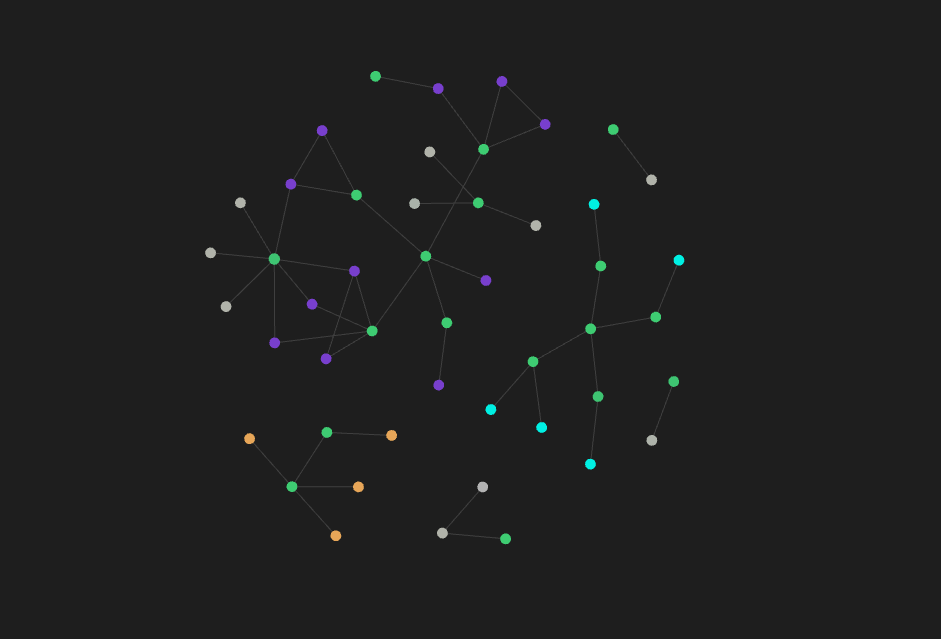
Hopefully as time goes on this graph will look a little more like those crazy constellations you see online. You know the ones I'm talking about, right? They look more like nebula than constellations, and they are honestly pretty inspiring. Regardless, I'm proud of the system I've established so far, and I'm excited for it to unlock my productivity and allow me to accomplish everything I want to.
Do I need Obsidian?
About 2 years ago I downloaded Obsidian.md for the first time and it stayed on my computer for about 20 minutes. I was looking for an application that would allow me to draw some of my notes for my classes at Weber State University. Upon seeing that I needed to download an "Excalidraw" plugin just to gain that ability, I said to myself, "I don't want to have to download anything else. It can't be that difficult!" Well, I wish I had been able to see Obsidian's true potential at that point, rather than brushing it off. I guess I was looking for a tool that would solve a problem separate from the one that Obsidian targets, and I brushed this application off as an afterthought.
Cut to the year 2025, I'm in my final year at Weber State, and I only wish I had learned of this software sooner. Obsidian appeals to me for the same reasons it appeals to so many others: - Locally stored markdown files - Rich plugin ecosystem (with a rather small barrier of entry as well) - The dataview plugin - Linked notes and the ability to see connections between all sorts of information - The change to learn even more hotkeys (I love hotkeys)
Diving head first into Obsidian over the last week has shown me everything that I've been missing out on, and has left me confidently saying, "Yes! I do need Obsidian." I can't say that you need Obsidian, but I can say that Obsidian makes taking notes and striving for productivity fun. This was something I needed as I've started to feel a little overwhelmed with life's commitments.
Regardless, here's a few of the ways I've configured Obsidian to fit my needs over the last 7 days since I started using it.
My To-Do Lists
The first plugin I downloaded after learning about this blessed piece of software was the Dataview plugin. Ubiquitously known as the way to turn your vault of information into a database, I guess there are a few competing technologies out there that you could try as well (Datacore and the official Obsidian Bases), but I believe that anyone who wants to get the most out of their notes should find some way to dynamically collect them into one place.
Wanting to learn how dataview works, I decided to give it a spin and make some to-do lists. I made a note and started a line with - [ ]. I wrote some portion of an assignment I need to do later and it turned into a magic checkbox. In another file I made the first query:
```dataview
TASK WHERE !completed
```
While it doesn't seem like much, I was pleased to learn that you can filter from a specific folder to narrow down your query. I made folders for school, work, home, Ty-Davis.com, and Davis Pictures LLC (my photography business). Using a few simple dataview queries I managed to put all of my to-do lists in one convenient place. The markdown code looks like this:
# Work To-do
```dataview
TASK FROM "CitySpark" WHERE !completed SORT file.ctime ASC
```
----
# Daily To-do
```dataview
TASK FROM "Daily" WHERE !completed SORT file.ctime ASC
```
----
# School To-do
```dataview
TASK FROM "School" WHERE !completed SORT file.ctime ASC
```
----
# Random To-do
```dataview
TASK WHERE contains(file.folder, "Random") AND !completed SORT file.ctime ASC
```
----
# Ty-Davis-com To-do
```dataview
TASK WHERE contains(file.folder, "Ty-Davis-com") AND !completed SORT file.ctime ASC
```
Once again, it's rather simple, but I personally believe it's rather elegant. The most beautiful part of all, is how you don't have to navigate to a specific place in order to make a new task. If I'm in any file inside my School folder, even one I just barely made, and I add a task, it'll show up here. To go a step further, the tasks themselves link back to the notes they're in. Looking at that one To-dos.md note that I've made allows me to link to any note that has anything to do with what I'm currently working on. *Chef's kiss*
Integration with my time-keeping application
Going along with the effort of getting to anywhere from anywhere, I made a small modification to my Timecard tool.
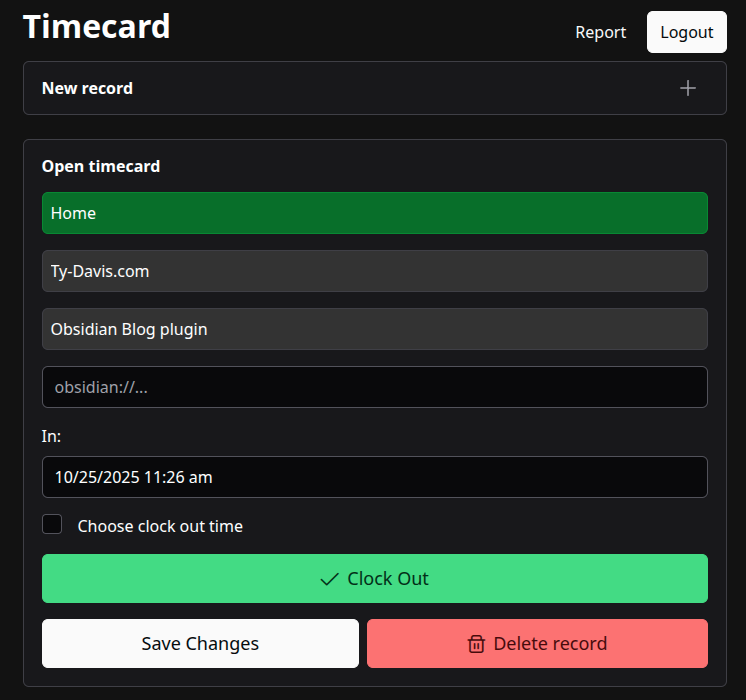
I added that small text field in there that says obsidian://..., which is simply a field that adds an external link on the page when you review that time record. By using the application URL interface like that, all of my devices know to open the corresponding note in the Obsidian app. It's very neat. Also, because I conveniently named the vault that I'm syncing up between my devices the same thing everywhere, the links work on each device I use, including my iPhone. Features like this make it feel like obsidian is my own thing, and I absolutely love it.
Obsidian is free
While Obsidian isn't open source (I guess its core is), it is freeware and I love it for that. In order to monetize, of course, the small yet mighty Obsidian team has made two features that sensibly cost money, those being Sync and Publish. While I'm not afraid of supporting developers who deserve it, I am a software developer and love the challenge of solving a problem that has already been solved. This task provided a few unique challenges that I haven't encountered yet before, so solving these problems has been a lot of fun.
Getting around Obsidian Sync
I know a lot of people use Google Drive and Git as solutions for this task, but I found one that has been almost-completely-seamless for me. The Self-hosted LiveSync plugin with the CouchDB backend was mostly straightforward to set up, and has worked flawlessly since I've gotten it set up. The settings take some reading and some fiddling, but once you get it set up it is rather responsive and extremely well put together. I never have to think about syncing my files between my devices, and having already setup a server under my own domain (https is required for use on iOS), the solution has been perfect for me.
Getting around Obsidian Publish
This one I took as more of a challenge. This blog you're reading existed before I started using Obsidian, so finding a solution that would acutely fit the needs of my current blog setup was impossible. Instead, I decided to make my own Obsidian plugin to accomplish the task. I asked an LLM for the scaffolding and it told me to just download the sample plugin repo on GitHub, which was certainly the right choice. It also wrote some code for the Obsidian plugin that did almost exactly what I needed.
As a brief overview, the plugin adds a command that allows you to publish any note straight to the blog on my website, assuming you have the right credentials, and I just needed to implement the REST endpoints on my server (running on Django and HTMX) to upload/update the content of a blog, as well as upload each of the images to my Cloudflare R2 object storage. Eventually I'll blog about it, and hopefully you'll get a chance to read about it then.
Some things I still need to get working
I'm sure that my processes for everything will change rapidly as time goes on, but the solutions I've found here seem that they'll last me a while. My biggest regret is not moving to Obsidian sooner. My primary note taking app for my 4.5 years in college has been OneNote. While it has been a great solution, I don't love the idea of being locked into their proprietary software for the rest of my life.
I found a tool online called ink2excal that very simply extracts the InkML data from your handdrawn notes and brings them right into Obsidian (assuming you use the excalidraw plugin). It works well, though the workflow is slow, but it only copies the InkML data. I was taking integrated notes switching swiftly between inserting screenshots from PDF copies of textbooks, to writing down \LaTeX-esque math equations, to drawing with my pen and tablet. It worked well enough, but with the notes hosted on Microsoft's servers I feel like they aren't really mine. I have a few ideas for how to solve this problem and get all my notes into Obsidian. At this point it's non-negotiable, I will get those notes into Obsidian one way or another, I'm just fearing that the most straightforward solution will be transferring the notes as html exports, which is something I'd like to avoid.
A report is due
In a few weeks and in a few months I'll revisit this topic and assess how my Obsidian setup has affected my productivity and effectiveness. I have a feeling this will make a larger difference for me and my productivity than any AI. I'll let you know what happens.